Pursuant to Kansas Board of Regents and WSU policy, all employees are required to annually disclose certain external interests, activities and consulting arrangements. The university has an internal platform designed for the collection and review of all such disclosures. This platform can be found in the myWSU portal under “Employee Required Training.” Employees who have not yet completed a disclosure will be prompted to complete the disclosure in its entirety. Employees who have previously timely completed a disclosure will simply be prompted to review and certify the accuracy of their prior submissions. Employees must complete and submit their disclosures by end of day Tuesday, April 30.

For additional guidance on how and what disclose, please review the Conflict of Interest “Frequently Asked Questions.” For any additional questions, please email coi@wichita.edu.

As a reminder, in addition to the annual disclosure process, WSU employees are required to disclose new external interests, activities, and consulting arrangements as soon as such situations become known.

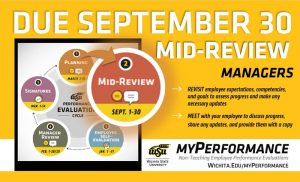
Step 1, planning, of the annual performance evaluation cycle for non-teaching employees has started and is due March 31. Managers can now login to myPerformance and add expectations, competencies, and goals for the current review period then meet with their employee to review and provide a copy of their evaluation for reference throughout the year.

Annual non-teaching employee performance evaluations for 2024-25 are now accessible for managers to complete the planning step of the myPerformance evaluation cycle. Planning should be completed by 11:59 p.m. Sunday, March 31.

The 2024-25 review period begins March 1, 2024 and ends on Feb. 28, 2025. Managers should log into myPerformance to add expectations, competencies and goals for the current review period then meet with their employees to review and provide a copy of their evaluation for reference throughout the year.

Helpful hints:

  • Managers have unlimited access to update and edit content on evaluations in myPerformance until the employee self-evaluation step begins Jan. 1, 2025.
  • Be sure to save and submit anytime you update or make changes to an evaluation. You still have access to make changes after you save and submit.
  • Employees don’t have access to their 2024-25 myPerformance evaluation until the employee self-evaluation step which is why it’s important to review and provide a copy of their evaluation for reference throughout the year.
  • To find in-progress or past evaluations in myPerformance, check the small box “Show completed and expired tasks” then click “Search.”

For more information (including myPerformance training, quick reference guides, and other resources) go to the myPerformance webpage (wichita.edu/myPerformance).

View of the new HR landing page on a laptop in the RSC.

The Office of Human Resources has launched a new professional development website as part of its continued focus on generating easier employee access to HR information, tools and resources.

Designed as a central hub for employees interested in professional development, it provides available resources including information needed to use them and course recommendations for developing the knowledge and skills most critical to fostering a culture of empowerment, leadership and ownership here at WSU.

The HR team would love to hear any feedback employees have as it continues to curate more resources and develop learning paths. Go to the professional development website to look around and explore any resources or curated content that interests you.

Email the HR Organizational Development team at hr.organizationaldevelopment@wichita.edu to share any feedback on the usability of the site or if there are other resources or content you would like to recommend.

Step 1, planning, of the annual performance evaluation cycle for non-teaching employees has started and is due March 31. Managers can now login to myPerformance and add expectations, competencies, and goals for the current review period then meet with their employee to review and provide a copy of their evaluation for reference throughout the year.

Annual non-teaching employee performance evaluations for 2024-25 are now accessible for managers to complete the planning step of the myPerformance evaluation cycle. Planning should be completed by 11:59 p.m. Sunday, March 31.

The 2024-25 review period begins March 1 and ends Feb. 28, 2025. Managers should log into myPerformance to add expectations, competencies, and goals for the current review period then meet with their employees to review and provide a copy of their evaluation for reference throughout the year.

Helpful hints:

  • Managers have unlimited access to update and edit content on evaluations in myPerformance until the employee self-evaluation step begins Jan. 1, 2025.
  • Be sure to save and submit anytime you update or make changes to an evaluation. You still have access to make changes after you save and submit.
  • Employees don’t have access to their 2024-25 myPerformance evaluation until the employee self-evaluation step which is why it’s important to review and provide a copy of their evaluation for reference throughout the year.
  • To find in-progress or past evaluations in myPerformance, check the small box “Show completed and expired tasks” then click “Search.”

For more information (including myPerformance training, quick reference guides, and other resources) go to the myPerformance webpage (wichita.edu/myPerformance).

Step 5, signatures, of the annual performance evaluation cycle for non-teaching employees has started and manager signatures are due March 14. Managers can now login to myPerformance and electronically sign their employee evaluations. Additionally, the planning step for the new evaluation cycle is accessible in myPerformance and is due on March 31.

Annual non-teaching employee performance evaluations for 2023-24 will be available for manager signatures beginning March 8 provided that their employee has submitted their employee signature in myPerformance.

Managers should log into myPerformance then electronically sign and submit their employee’s 2023-24 evaluation by 11:59 p.m. Thursday, March 14.

Helpful hints:

  • Progress through each page of the evaluation to review all comments and ratings.
  • Enter your name in the signature field, click “Sign,” and then click “Submit” on the approval signature page and the submit review pop-up window.
  • Check the box that says “Show completed and expired tasks” if you think an evaluation has disappeared from your scheduled tasks.
  • Don’t forget that the first step of the 2024-25 myPerformance evaluation cycle, planning, is due March 31.

Note: The first step of the evaluation cycle, planning, for 2024-25 evaluations is accessible to managers in myPerformance. The planning step is for setting expectations and goals for the new review period which runs March 1, 2024 through Feb. 28, 2025. If you have not already done so, you should enter and submit this information in myPerformance, and then meet with your employees by March 31. Your employees will not have access to their 2024-25 evaluation until Jan. 1, 2025, so it is important to provide them with a copy to use as a reference throughout the year.

For more information (including myPerformance training, quick reference guides, and other resources) go to the myPerformance webpage (wichita.edu/myPerformance).


View of the new HR landing page on a laptop in the RSC.

The Office of Human Resources has launched the first pages of its new website. You’ll notice a new look and feel to the HR website starting today and continuing throughout the year as it generates easier employee access to HR information, tools and resources.

Designed to improve navigation for existing employees and potential candidates, it brings the information, tools and resources that you are looking for to the forefront of the page. This new landing page also highlights employee success, important news and how the HR team is here to help you.

The HR team would love to hear any feedback you have as they continue this work. Go to the main landing page and look around. Use the survey widget on the site to share any feedback on the usability of the site or if there are resources you would like to see as a quick link.

Stay tuned for further development of the service area pages.

Step 5, signatures, of the annual performance evaluation cycle for non-teaching employees has started and employee signatures are due March 7. Employees can now login to myPerformance, review their evaluation, add any final comments, and electronically sign their evaluation.

Annual non-teaching employee performance evaluations for 2023-24 will be available for employee signatures beginning March 1 provided that their manager has submitted their manager review in myPerformance.

Employees should log into myPerformance then electronically sign and submit their 2023-24 evaluation by 11:59 p.m. Thursday, March 7.

Helpful hints:

  • Let your manager know if you don’t have access to your evaluation. Managers must “Submit” their manager review for you to have access.
  • Progress through each page of your evaluation to review all comments and ratings.
  • Enter your name in the signature field, click “Sign,” and then click “Submit” on the approval signature page and the submit review pop-up window.
  • To find in-progress or past evaluations in myPerformance, check the small box “Show completed and expired tasks” then click “Search.”

For more information (including myPerformance training, quick reference guides, and other resources) go to the myPerformance webpage (wichita.edu/myPerformance).

Step 4, manager review, of the annual performance evaluation cycle for non-teaching employees has started and is due February 29. Managers of non-teaching employees can now login to myPerformance, provide summary comments about their employee’s job performance and accomplishments for the year, rate their employee in each competency, and then meet with their employee to deliver their annual performance review.

Annual non-teaching employee performance evaluations for 2023-24 are now accessible to managers to complete the manager review step of the myPerformance evaluation cycle. Managers, go to myPerformance to access and complete performance evaluations for your non-teaching employees which are due by 11:59 p.m. Feb. 29.

Follow these steps to complete your evaluations for the 2023-24 review period which began March 1, 2023 and end Feb. 29:

  • Provide summary comments for expectations, competencies and goals.
  • Select rating for all competencies.
  • Progress through each page of the evaluation and select “save” then “submit” on the final summary page for the evaluation.
  • Meet with your employee(s) to review their evaluation and provide them with a copy.

Helpful hints:

  • Managers have unlimited access to update and edit performance evaluations throughout the month of February.
  • Evaluations must be saved and submitted to progress to the employee signature step on March 1. Employees will not have access to their evaluation if the manager has not submitted their review.
  • Managers can add co-planners during this step. A co-planner is someone who has managed a portion of the employee’s work assignment during the evaluation period.
  • To find in-progress or past evaluations in myPerformance, check the small box “Show completed and expired tasks” then click “search.”

NOTE: End of year performance review conversations are also a great time to set expectations and goals for the new review period. The 2024-25 evaluations are now accessible to managers in myPerformance so you can discuss both the current end-of-review (2023-24 Manager Review) and the upcoming begin-of-review (2024-25 Planning) at the same time, if desired.

For more information (including myPerformance training, quick reference guides and other resources) go to the myPerformance webpage (wichita.edu/myPerformance).

Step 4, manager review, of the annual performance evaluation cycle for non-teaching employees has started and is due February 29. Managers of non-teaching employees can now login to myPerformance, provide summary comments about their employee’s job performance and accomplishments for the year, rate their employee in each competency, and then meet with their employee to deliver their annual performance review.

Annual non-teaching employee performance evaluations for 2023-24 are now accessible to managers to complete the manager review step of the myPerformance evaluation cycle. Managers, go to myPerformance to access and complete performance evaluations for your non-teaching employees which are due by 11:59 p.m. Feb. 29.

Follow these steps to complete your evaluations for the 2023-24 review period which began March 1, 2023 and end Feb. 29:

  • Provide summary comments for expectations, competencies and goals.
  • Select rating for all competencies.
  • Progress through each page of the evaluation and select “save” then “submit” on the final summary page for the evaluation.
  • Meet with your employee(s) to review their evaluation and provide them with a copy.

Helpful hints:

  • Managers have unlimited access to update and edit performance evaluations throughout the month of February.
  • Evaluations must be saved and submitted to progress to the employee signature step on March 1. Employees will not have access to their evaluation if the manager has not submitted their review.
  • Managers can add co-planners during this step. A co-planner is someone who has managed a portion of the employee’s work assignment during the evaluation period.
  • To find in-progress or past evaluations in myPerformance, check the small box “Show completed and expired tasks” then click “search.”

NOTE: End of year performance review conversations are also a great time to set expectations and goals for the new review period. The 2024-25 evaluations are now accessible to managers in myPerformance so you can discuss both the current end-of-review (2023-24 Manager Review) and the upcoming begin-of-review (2024-25 Planning) at the same time, if desired.

For more information (including myPerformance training, quick reference guides and other resources) go to the myPerformance webpage (wichita.edu/myPerformance).

To help you plan your time off and work schedules throughout the year, Wichita State is happy to share the 2024 holidays.

Holidays for State of Kansas employees are designated on an annual basis by the governor of the State of Kansas and the Kansas Board of Regents (KBOR) for eligible employees.

The following dates have been designated as paid holidays for all departments of Wichita State for the 2024 calendar year. This information is available online at any time.

  • Discretionary Day*
  • New Year’s Day – Monday, Jan. 1
  • Martin Luther King, Jr. Day – Monday, Jan. 15
  • Memorial Day – Monday, May 27
  • Juneteenth – Wednesday, June 19
  • Independence Day – Thursday, July 4
  • Labor Day – Monday, Sept. 2
  • Veterans Day – Monday, Nov. 11 (classes are in session on this day)
  • Thanksgiving Day – Thursday, Nov. 28 and Friday, Nov. 29
  • Christmas Day – Wednesday, Dec. 25

*The discretionary day must be used during the payroll calendar year. For 2024, it must be utilized between Dec. 24, 2023 and Dec. 21, 2024. This paid leave benefit is used for observance of a holiday, family event or other special day. Employees who work a Monday through Friday schedule should plan to use their discretionary day on or before Friday, Dec. 20, 2024.

Employees will not be paid for the discretionary day in lieu of taking the time off, and the banked hours expire at the end of each payroll year. Employees will use standard leave request procedures to seek leader approval in advance of taking the discretionary day.

The 2024 Winter Closedown period has not yet been developed and approved by university leadership. Once that has been completed, the schedule will be communicated to ensure all employees can manage their time off appropriately.