Watch your inbox this week for an email from HR Total Rewards with the subject line “Changes to your Benefit Deductions.” This email will show changes in deduction amounts for the benefit elections you made during open enrollment for coverage beginning Jan. 1, 2026.
Note:
The 2026 benefit elections have been finalized and cannot be changed.
If the new deductions match what you elected for 2026 there is no action required. You can review your benefit elections in the Pending Election Statement email you received from SEHP.
If there is a discrepancy, reply directly to the email you receive, and a member of the team will respond after winter break. If you do not receive an email, it simply means that your elections and deduction amounts will not change.
Recent new hires: Reminder that you may have multiple premium deductions on the first paycheck that includes benefit premium deductions.
In preparation for the 2025 Winter Break (dates and details are available on the Leave Administration webpage), the HR Talent Acquisition team will implement the following deadlines related to hiring all positions (excluding Division of Industry and Defense Programs). This will provide a more positive experience for candidates and ensure positions are posted and employees are hired successfully prior to the shutdown.
Approvals
Any items submitted after Wednesday, Dec.17, 2025, that require HR Employment approval will be processed after our return on Jan. 5, 2026.
For hiring benefit eligible (BE) positions:
The first New Employee Orientation (NEO) in 2026 is on Tuesday, Jan. 6, 2026. To attend this session:
Candidate(s) must have accepted their offer(s) by Monday, Dec.15, 2025.
Candidate(s) must have completed all onboarding tasks by the end of the day on Thursday, Dec.18, 2025.
Candidates who have not completed onboarding by the deadline may have their start date moved to the next available date and corresponding NEO.
For Hiring Non-Benefit Eligible (NBE) Positions (i.e., student, grad, lecturer, temp)
Candidates with an effective date of Jan. 4 must meet the following:
Candidate(s) must have accepted their offer(s) by Monday, Dec. 15, 2025.
Candidate(s) must have completed all onboarding tasks by end of day on Thursday, Dec. 18, 2025.
Candidates who have not completed onboarding by the deadlines noted above may have their start date moved to the next available date.
All Add-Job ePAFs for WSU and ICAA must be fully approved by Wednesday, Dec. 17, 2025.
*Please note that all new hires must have completed all onboarding and be updated to “hired” status by HR before they can start work.*
If you have any questions, please email the Talent Acquisition team at employment@wichita.edu.
Managers of non-teaching employees, here’s what you need to know.
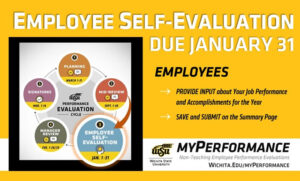
At the start of January, your employees will be able to view content you entered during the planning and mid-review steps of the evaluation cycle when they go in to complete their self-evaluation. You’ll regain access to their evaluations for the manager review during the month of February.
Please complete these steps before the winter break to prepare for employee self-evaluations:
Update any of your comments on your employees’ competencies and goals if necessary.
Save and submit on the summary page to ensure your comments route to your employee.
Touch base with your employees about upcoming self-evaluations and ensure they have what they need to successfully evaluate themselves at the start of January.
More information to come at the beginning of January for the employee self-evaluation.
Managers can access employee evaluations in myPerformance.
For more information (including myPerformance training, quick reference guides and other resources) go to wichita.edu/myPerformance.
To find in-progress or past evaluations in myPerformance, check the small box “Show completed and expired tasks” then click “Search.” Select the evaluation and you’ll have the option to print or save to PDF.
A change is being implemented in Wuhire regarding job requisitions for GAs, LPs and RS/WS/AL positions and their corresponding advertising (sourcing) timelines to the academic semester in which the roles are needed.
What is changing
Effective immediately:
Job reqs (GA/LP/RS/WS/AL) will only be advertised and open for applications during the same semester which the job requisition is approved and needed for hiring.
Job reqs will display a sourcing (advertising) closing date, which reflects when the job req will no longer be able to accept applications.
Semester posting windows and requisition end dates:
Semester hiring for
Advertising period
Advertising closed
Fall
Fall semester only
Beginning of December
Spring
Spring semester only
Beginning of May
Summer
Summer semester only
Beginning of July
Example: A fall GA or LP posting submitted in August will advertise through the fall term and will have an advertising end-date in December.
Key clarifications:
The sourcing close date restricts new applications on the job req.
The requisition itself will remain available for hiring on so long as there are open positions available.
Departments may continue hiring to that requisition throughout the semester (again, provided open positions remain).
If all positions on a job req have been hired, the job req cannot be used any longer and HR will close it, considering it as filled.
If a job req of these types is submitted towards the end of a semester (November/December, April/May, July):
It will be assumed the hiring is intended for the following semester, in which the advertising (sourcing) will extend through the upcoming semester advertising period; so hiring timelines remain supported and clear.
You will start to see sourcing (advertising) close dates associated with your current job req. The closing date can be found in your jobs list page under the ‘sourced’ column. We appreciate your partnership as we refine recruitment processes to better support academic hiring needs. If you have questions, please reach out to the Talent Team by way of employment@wichita.edu.
Job reqs created prior to July 1, 2025 cannot be copied
In our efforts to refine the Wuhire system, we are committed to identifying features that improve efficiencies and align with institutional standards. To support these priorities, and with your partnership, we are implementing the following update. The following does not apply to IDP, due to their difference in data entry methods and hiring process.
Effective immediately, job requisitions may not be copied if the original requisition was created prior to July 1, 2025.
This change is essential to ensure accurate data flow between WuHire and subsequent integrated university systems, uphold compliance, create a smooth hiring process for both departments and candidates, and maintain consistency as we continue our improvement efforts since launch.
To identify when a job req was originally created, please review your job req from your jobs list (either current recruitment or non-current recruitment), and check the ‘Date Created’ in the history.
If the job req may have been copied previously, verify this through the revision history to ensure the original was not created prior July 1, 2025. Revision history can be found as follows:
Go into the job req
Click on ellipses next to “View Applicants”
Choose “Revision History”
Check the “Date Request Started”
If the “From” and “To” field dates differ then the job req was copied from a previous version. This is an instance of a job req that cannot be copied.
We encourage everyone to follow the steps above and attend Wuhire trainings as often as needed. Should you still have questions, you may reach out with questions to the Talent team by way of employment@wichita.edu.
Thank you for your understanding and partnership as we work to serve you the best we can.
In preparation for the 2025 winter break (dates and details are available on the Leave Administration webpage), the HR Talent Acquisition team will implement the following deadlines related to hiring all positions (excluding Division of Industry and Defense Programs). This will provide a more positive experience for candidates and ensure positions are posted and employees are hired successfully prior to the shutdown.
Approvals
Any items submitted after Wednesday, Dec. 17 that require HR Employment approval will be processed after our return Jan. 5, 2026.
For Hiring Benefit Eligible (BE) positions:
The first New Employee Orientation (NEO) in 2026 is on Tuesday, Jan. 6, 2026. To attend this session:
Candidate(s) must have accepted their offer(s) by Monday, Dec. 15.
Candidate(s) must have completed all onboarding tasks by end of day on Thursday, Dec. 18.
Candidates who have not completed onboarding by the deadline may have their start date moved to the next available date and corresponding NEO.
For Hiring Non-Benefit Eligible (NBE) positions (i.e., student, grad, lecturer, temp)
Candidates with an effective date of Jan. 4 must meet the following:
Candidate(s) must have accepted their offer(s) by Monday, Dec. 15.
Candidate(s) must have completed all onboarding tasks by end of day on Thursday, Dec. 18.
Candidates who have not completed onboarding by the deadlines noted above may have their start date moved to the next available date.
All Add-Job ePAFs for WSU and ICAA must be fully approved by Wednesday, Dec. 17.
Please note that all new hires must have completed all onboarding and be updated to “hired” status by HR before they can start work.
Open Enrollment for 2026 closes at 11:59 p.m. today, Oct. 31. If you have not yet submitted your enrollment by that time, you will be enrolled in a default medical plan. Members who waived medical coverage in 2025 will continue to be waived in 2026 if they do not submit an enrollment.
Still need help making your 2026 election decision? Ask ALEX.
The Total Rewards team has created multiple instructional documents with images of the portal and step-by-step instructions! Get help with:
Open Enrollment for 2026 closes at 11:59 p.m. Friday, Oct. 31. If you have not yet submitted your enrollment by that time, you will be enrolled in a default medical plan. Members who waived medical coverage in 2025 will continue to be waived in 2026 if they do not submit an enrollment.
Still need help making your 2026 election decision? Ask ALEX.
The Total Rewards team has created multiple instructional documents with images of the portal and step-by-step instructions. Get help with:
2026 Benefits Open Enrollment is almost over. Log in to the Member Administration Portal at sehp.member.hrissuite.com to make your elections by Oct. 31.
All benefits-eligible state employees must make their 2026 elections by the deadline on Oct. 31. Employees enrolled in medical coverage who do not make a new election will be defaulted into medical Plan N with a use-it-or-lose-it HRA.
2026 Benefits Open Enrollment is almost over. Log in to the Member Administration Portal at sehp.member.hrissuite.com to make your elections.
All benefits-eligible state employees must make their 2026 elections by the deadline on Oct. 31. Employees enrolled in medical coverage who do not make a new election will be defaulted into medical Plan N with a use-it-or-lose-it HRA.
The 2026 Offer and Onboarding Calendar has been finalized to support your hiring efforts for the upcoming year. This calendar contains hire dates and respective deadlines for offer acceptance and onboarding completion. Please choose a start date that allows time for offer approval, offer acceptance and five business days for onboarding.
The calendar is available on the WuHire Information Hub in the Offer and Onboarding Calendars folder. Be aware that offers sent to HR that do not adhere to these deadlines will be declined and sent back for correction to their respective departments. If an offer is declined due to missing the required deadlines, the candidate cannot begin work on the originally proposed start date. A new offer with an updated start date must be submitted and approved.
As a reminder, onboarding must be fully completed by the close of business the Thursday prior to the hire date. This lead time allows for system access and email account setup, so the new employee has the necessary tools and resources in place on their first day. Remember that new hires cannot begin work until they’ve completed onboarding and are officially marked as “Hired” in WuHire by HR. Allowing an employee to begin work prior to onboarding completion exposes the university to potential safety and compliance issues, which could include violating internal policies and federal law. Your adherence to this process is not only appreciated but is vital to ensuring the safety and security of our staff, students, and the broader university community.
Following these guidelines helps ensure a smooth and positive onboarding experience while also supporting consistent compliance with hiring policies and procedures. We truly appreciate your partnership, which is essential to the success of our shared efforts.