Illustration of a person looking up ITS Services on their computer.

As the new semester begins, WSU’s Information Technology Services (ITS) would like to remind you of the best way to reach ITS Client services for assistance with your computer and technology needs.

To access various technology help tickets, go to wichita.edu/desktoptickets. If you have a university-owned computer, an icon will have also been added to your computer titled “computer support ticket” that will take you to this site. On this site, you will have squares presenting various options for ticket types.

  • For help with passwords, general software help and technical questions that can be solved over the phone, select “Contact the Helpdesk.”
  • For help fixing an issue with your computer or accessories, select “Request computer repair.”
  • For installation of new software, setup of new computers or configuration changes, select “Request computer setup and software installation.”
  • For quotes for new software your department would like to purchase, select “Request a quote for software.”
  • For quotes for new computer hardware, select “Request a quote for computer hardware.”

To speak to someone immediately, contact the Helpdesk at 316-978-4357 and select option 1.

Information Security is pleased to announce that, starting July 9, WSU passwords will no longer expire. This change aligns with the National Institutes of Technology (NIST 800-63b) standards and guidelines.

What this means for you:

  • You will no longer be required to change your password every 180 days.
  • Password updates will only be necessary if you forget your password or your WSU account is compromised or suspected of being compromised.

If you have any questions or concerns, please contact the ITS Help Desk at 316-978-4357, option 1, or helpdesk@wichita.edu.

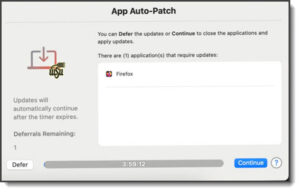
Image example of the App Auto Patch update window stating the ability to defer the update if needed or clicking continue to process the update

Up to date applications keep your devices more secure. To help keep Mac computers up to date, ITS will be deploying a solution Tuesday, June 17 that will automatically update applications on Wichita State owned Macs.

When an application needs to be updated, an App Auto Patch window will pop up on your Mac to begin the update. Clicking continue will close and update the application. Please ensure you save your data before clicking continue. The update may be deferred if you cannot close the application at that time.

If you have any issues or concerns, contact the helpdesk at 316-978-4357 option 1, or helpdesk@wichita.edu.

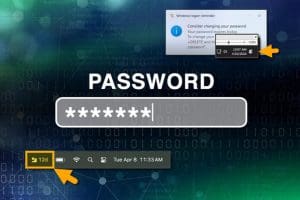
Image of Password and examples of Windows notifications and Mac notifications regarding expiring passwords.

This is a quick reminder that your Wichita State password will expire after 180 days. To ensure uninterrupted access to your accounts, take note of the following information regarding password expiration notifications.

WSU utilizes Microsoft’s Self-Service Password Reset (SSPR) process for both password setup and password reset/recovery. However, Microsoft does not provide email reminders when it is time to reset your password. Instead, notifications are received as follows:

  • Windows devices
    • For users on WSU-owned Windows devices, Microsoft will notify you that your password will expire in five days with a pop-up notification located in the bottom right corner of your Windows screen.
    • To view these notifications, click the notifications icon in the bottom right of the taskbar.
  • Mac devices
    • For Mac users on WSU-owned devices, there is a password reset countdown in the top right corner of the menu bar.

Ensure you reset your password promptly to avoid any disruptions. Additional information regarding changing your password is located at wichita.edu/password.

For questions or assistance, contact the ITS Help Desk at 316-978-4357, option 1 or email helpdesk@wichita.edu.


To ensure compliance and enhance security, Information Technology Services (ITS) is implementing the VPN Login Lifetime feature for VPN connections. Starting Wednesday, April 30, VPN connections for vpn-emp, vpn-mac and vpn-student will automatically log out after 18 hours of continuous connection.

Why this change?

Compliance requires that client machines disconnect from the VPN when not actively in use. Although there is an inactivity logout set, most client machines maintain constant communication with domain controllers and other campus servers, preventing the VPN from recognizing idle connections. Therefore, ITS is setting a maximum VPN connection duration of 18 hours to fully disconnect communication.

What you need to know:

  • Automatic logout: After 18 hours of continuous connection, the VPN will automatically disconnect.
  • Warning notification: You will receive a warning 30 minutes before the VPN disconnects, allowing you to save your work and prepare for the reconnection.
  • Reconnecting: Simply click Reconnect on the VPN client to restore VPN Connection.

ITS understands that this change may require some adjustment, but it is essential for maintaining the security and compliance of the network.

For questions, contact the ITS Help Desk at 316-978-4357, option 1, or email helpdesk@wichita.edu.

Wichita State owned iOS devices (iPhones, iPads, etc.), where the iOS version is older than version 16, will no longer be supported due to security concerns and lack of Duo support. These devices will be disabled by the end of July.

A daily notification will be displayed on the targeted devices that meet the criteria beginning May 1. This notification will let the user know that their device will be disabled July 30.

For assistance on how best to retire or replace your device, contact the Help Desk at 316-978-4357, option 1, or email helpdesk@wichita.edu.

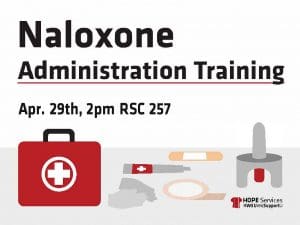
Naloxone Administration Training April 29th at 2 pm in RSC room 257. Parts of a first aid kit below the caption.

Naloxone is a life-saving medication that can reverse an overdose from opioids. Health, Outreach, Prevention and Education (HOPE) Services is presenting DCCCA’s one-hour naloxone administration course from 2 to 4 p.m. Tuesday, April 29 to the WSU community to equip participants with the knowledge and skills necessary to identify and respond to an overdose crisis using naloxone and other available resources.

Students can sign up for trainings online and staff/faculty can register via myTraining.

Duo Remote Desktop Connections currently have a time-out process of two hours when not being actively utilized.

When a Remote Desktop Connection session is idle or disconnected for two hours, the remote session will be automatically closed. When this happens, the user is automatically logged out of the remote computer and all applications on the device being remoted into are closed. The process is intentional since inactive remote desktop sessions can be vulnerable to exploitation. The university has implemented this measure to reduce the risk as defined by the National Institution of Standards and Technology (NIST) and required by the State of Kansas and Kansas Board of Regents (KBOR).

For best practice, make sure to save all files prior to disconnecting from any Remote Desktop Connection to prevent losing any data.

If you have any questions, contact ITS Help Desk at 316-978-4357, option 1, or helpdesk@wichita.edu.

Beginning on March 10, multifactor authentication (MFA) will be required for utilizing Remote Desktop services on university-owned Windows devices. Once the required MFA update is pushed to the devices, it may take up to 90 minutes for it to finalize. A reboot of the computer is needed for Duo Authentication to take effect after the update is completed.

What this means for you? In order to access a university owned Windows device using Remote Desktop from another device, you will be required to Duo Authenticate when logging in.

Why is this being required? Information Security is requiring this additional step to enhanced security and meet compliance regulations.

Note: The Remote Desktop session will time out after two hours of inactivity.

For questions, please contact ITS Help Desk at 316-978-4357, option 1 or helpdesk@wichita.edu.

As of Feb. 17, the current version of the Duo Mobile app will no longer be available for iOS devices with version 15 or earlier. iOS 16 will be the minimum supported version for the Duo Mobile app.

Duo recommends upgrading to the most recent version of iOS available for your device. The Duo Mobile app is compatible with the M1 iPad Pro.

For questions, contact the ITS Help Desk at 316-978-4357, option 1, or helpdesk@wichita.edu.