To help protect the WSU community and respond to an increasingly active cybersecurity threat landscape, Information Technology Services is implementing updates and security changes more frequently. Some of these updates require system restarts to fully protect your device and university data. Frequent patching and timely reboots are widely recommended security practices because they ensure critical security fixes are applied as quickly as possible.

What this means for you

While ITS will attempt to minimize disruption and offer opportunities to delay a restart where feasible, there may be rare occasions when your computer requires an unexpected restart to complete important security updates.

To help prevent the loss of work, ITS asks all faculty, staff and student employees to adopt the following habits:

  • Save all open documents before leaving your workstation.
  • Close documents and applications you are not actively using.
  • Ensure important work is stored in OneDrive, SharePoint or another approved location with auto-save enabled
  • Avoid leaving unsaved work open for extended periods.
  • Lock your workstation to protect your information every time you step away.

Making this a routine habit will protect your work and help ensure your device remains secure and compliant.

Why reboots matter

Security updates often cannot fully take effect until a device restarts. Delaying reboots can leave systems vulnerable even after updates have been downloaded and installed. Microsoft notes that many Windows updates require a restart to complete installation and apply protections properly.

A best practice is to reboot your device daily to ensure all updates are applied and the computer is fresh and ready for the new day. If rebooting daily isn’t feasible, once a week is recommended.

Thank you for helping keep Shockers secure, resilient and ready for the future.

For questions or concerns, contact the ITS Help Desk at 316-978-4357, option one, or helpdesk@wichita.edu. 

Wichita State’s Virtual Private Network (VPN) provides secure, encrypted access to WSU computing resources when you’re working remotely.

To improve consistency and support, the VPN for Mac users is being updated. Both Mac and Windows users will connect through the same VPN portal: vpn-emp.wichita.edu.

The existing Mac VPN portal vpn-mac.wichita.edu will be discontinued on April 30. After this date, connections using the old Mac VPN will no longer work.

What Mac users need to do:

Because of this update, Mac users will need to update their VPN settings by April 30:

  • Remove or modify the previous Mac VPN configuration
  • Add vpn-emp.wichita.edu in GlobalProtect on your Mac

Follow these step‑by‑step instructions or visit wichita.edu/vpn for additional information.

If you have questions or need assistance, contact ITS Help Desk at 316-978-4357, option 1, or helpdesk@wichita.edu

Information Technology Services (ITS) is pleased to announce an expansion of browser support for Enterprise Single Sign‑On (SSO) on ITS‑managed Windows devices.

Beginning Tuesday, April 7, Google Chrome will join Microsoft Edge as a supported browser for Enterprise SSO on ITS‑managed Windows computers.

This enhancement allows your Windows login credentials to securely pass through to most WSU‑owned applications, letting you:

  • Sign in once using your Windows credentials
  • Use your device as a second authentication factor
  • Avoid repeated logins and most DUO prompts

This option is currently only available on ITS-managed Windows devices but will be coming to ITS-managed Macs later this year.

Reminder:

  • Personal computers and mobile devices will still require authentication using the DUO app
  • Remote Desktop (RDP) access will continue to require DUO for all users

This update improves both security and convenience, reducing sign‑in steps while maintaining strong authentication for university systems.

For any questions or concerns, contact the ITS HelpDesk at 316-978-4357, option 1, or helpdesk@wichita.edu. 

As part of on-going efforts to maintain secure IT systems at Wichita State, on March 10, Information Technology Services (ITS) will be applying a number of new settings to WSU-owned Windows computers.

These settings will disable older, less secure protocols, enforce higher levels of encryption on the campus network and help to reduce malware infections. These setting will not affect functionality, and most users will not notice anything different in daily use.

The main difference that users will notice is a change when logging into their computers. Users will now be required to use Ctrl+Alt+Delete when logging on.

If you experience any other issues, contact the ITS Help Desk at 316-978-4357, option 1, or helpdesk@wichita.edu

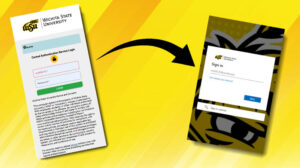
Image showing previous login example with arrow showing new login example.

As part of a continuing effort to improve user authentication processes across WSU enterprise applications, the way that users will login to myWSU and Banner is changing. Users will now be prompted to sign in with their myWSUID@wichita.edu as their username and continue to use their current WSU password.

Users who have already logged into a system using this login procedure, such as Microsoft 365, may not be prompted to enter their username or password when signing into these applications.

Information Technology Services (ITS) plan to make this change on Tuesday, Feb. 24.

For questions, contact ITS Helpdesk at 316-978-4357, option 1 or helpdesk@wichita.edu.

The Offices of Information Technology Services (ITS) will be closed from noon to 5 p.m. Wednesday, Dec. 17 for a staff event. Normal business hours will resume Thursday, Dec. 18.

Jeanne Patton

After more than 14 years of dedicated service, Jeanne Patton will be retiring on Dec. 5.

Jeanne began her journey with Wichita State in July 2011 as an administrative assistant in the Provost Office, where her attention to detail and commitment quickly earned her a promotion to budget analyst. In 2018, she transitioned to Information Technology Systems, taking on the role of director of ITS business and finance operations. Her leadership and financial insight have played a vital role in strengthening ITS operations and advancing key initiatives.

Jeanne is widely admired for her kindness, generosity and thoughtfulness. She never hesitates to assist anyone who reaches out to her, consistently sharing her deep knowledge of the university’s business processes with new business managers and helping them feel supported and confident in their roles. Her willingness to mentor, collaborate and uplift others has made her a cherished coworker and friend.

Jeanne’s contributions have left a lasting impact, and colleagues throughout Wichita State will deeply miss her.

Join a come-and-go celebration and farewell event for Jeanne from 3 to 5 p.m. Dec. 5 in 262 Rhatigan Student Center, Herrman Room. Share your memories, express your appreciation and wish Jeanne well in her next chapter.

After more than 14 years of dedicated service, Jeanne Patton will be retiring on Dec. 5.

Jeanne began her journey with Wichita State in July 2011 as an administrative assistant in the Provost Office, where her attention to detail and commitment quickly earned her a promotion to budget analyst. In 2018, she transitioned to Information Technology Systems, taking on the role of director of ITS business and finance operations. Her leadership and financial insight have played a vital role in strengthening ITS operations and advancing key initiatives.

Jeanne is widely admired for her kindness, generosity and thoughtfulness. She never hesitates to assist anyone who reaches out to her, consistently sharing her deep knowledge of the university’s business processes with new business managers and helping them feel supported and confident in their roles. Her willingness to mentor, collaborate and uplift others has made her a cherished coworker and friend.

Jeanne’s contributions have left a lasting impact, and colleagues throughout Wichita State will deeply miss her.

Save the date for a come-and-go celebration and farewell event for Jeanne from 3 to 5 p.m. Dec. 5 in 262 Rhatigan Student Center, Herrman Room. Share your memories, express your appreciation and wish Jeanne well in her next chapter.

Image of two pictures of Shadi and stating that her retirement celebration will be on October 3rd from 3 to 5 at RSC room 265.

After 20 years of dedicated service to WSU ITS, Shadi Tafaroji will be retiring Oct. 3. Join in celebrating her incredible career and contributions at a retirement reception from 3 to 5 p.m. Friday, Oct. 3 at 265 Rhatigan Student Center, Lucas Room. Remarks planned for 3:30 p.m.

Shadi began her journey with WSU ITS in 2005 as a lab manager in Client Services, quickly rising through the ranks to become desktop support manager, and then director of Client Services in 2014. Her leadership has shaped the department and inspired countless students and staff.

Always advocating for collaboration and excellence across institutions, Shadi has played an important role on the planning committee for CHECK (Conference on Higher Education Computing in Kansas), a member of the ITSA (Information Technology and Services Advisory) Committee and served as co-chair for the KBOR Client Services Affinity Group.

Shadi is not only a director but also a mentor, a supportive colleague and a champion for students. Her warmth, wisdom and dedication will be deeply missed.

The community can come together to honor Shadi’s remarkable career and wish her the very best in her next chapter.

A small update has been made to the Central Authentication Service (CAS) login page. CAS is the system used to log into many WSU services, such as myWSU and Blackboard, with just one set of credentials.

  • What’s changing? A usage agreement will now appear directly below the login box to help users better understand the terms of access when signing in.
  • No impact to functionality: This update does not affect the login process or any other functionality. Users will continue to log in as usual.
  • Planned release: This update is scheduled to be deployed on Monday, Aug. 11.

Thank you for your support as we continue to improve clarity and transparency.

For questions or concerns, please contact the ITS Help Desk at 316-978-HELP (4357) or helpdesk@wichita.edu.