Shocker PROUD with Wu logo.

Wichita State desires to create a strong community wherein all who serve and are served by the university have an exceptional experience. The university has adopted Service Standards, known as Shocker PROUD, which identify common things we can all do to create a welcoming environment and promote WSU.

Go to myTraining and search for “Shocker PROUD Service Standards” to view available session times and register.

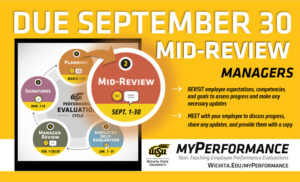
Step 2, mid-review, of the annual performance evaluation cycle for non-teaching employees has started and is due September 30. Managers should revisit employee expectations, competencies, and goals to assess progress and make any necessary updates then meet with their employee to discuss progress, share any updates, and provide them with a copy.

Managers, it’s time to complete the mid-review step of the myPerformance evaluation cycle for your non-teaching employees. The mid-review step is your opportunity to do a formal progress check-in with your employees now that we’re halfway through the annual performance evaluation period that began March 1, 2025 and ends Feb. 28, 2026. Go to myPerformance to access and complete mid-reviews which should be completed by Sept. 30.

Follow these steps to complete mid-reviews for your non-teaching employees:

  • Add comments regarding your employee’s performance and progress on their expectations and goals for the first half of the evaluation period.
  • Make any necessary updates to expectations and goals for the last half of the evaluation period.
  • Save and submit your updates.
  • Meet with your employees to review their progress, share any updated expectations and goals, and provide them with a copy.

Helpful hints:

  • Managers have unlimited access to update and edit content on evaluations in myPerformance until the employee self-evaluation step begins Jan. 1, 2026.
  • Be sure to save and submit anytime you update or make changes to an evaluation. You still have access to make changes after you save and submit.
  • Employees don’t have access to their 2025-26 myPerformance evaluation until the employee self-evaluation step which is why it’s important to review and provide a copy of their evaluation for reference throughout the year.
  • Managers can add co-planners during this step. A co-planner is someone who has managed a portion of the employee’s work assignment during the evaluation period.
  • To find in-progress or past evaluations in myPerformance, check the small box “Show completed and expired tasks” then click “Search.”

For more information (including myPerformance training, quick reference guides, and other resources) go to wichita.edu/myPerformance.

Shocker PROUD with Wu logo.

Wichita State desires to create a strong community wherein all who serve and are served by the university have an exceptional experience. The university has adopted Service Standards, known as Shocker PROUD, which identify common things we can all do to create a welcoming environment and promote WSU.

Go to myTraining and search for “Shocker PROUD Service Standards” to view available session times and register.

State of Kansas Employee 40- and 50- Year Anniversaries.

Seven Wichita State faculty and staff reached a remarkable milestone in their careers in 2024. A special ceremony was held April 28 at the Kansas State Capitol Building to celebrate their dedication and the legacy they have each built over the last 40 and 50 years. Gov. Laura Kelly expressed her appreciation and recognized the invaluable contributions they have made throughout their tenure and the lasting impact they’ve had on the state of Kansas.

Celebrating 40 years of service:

  • Alva Olmstead, Central Energy Plant
  • Don Harkness, Facilities Services Director’s Office
  • Cathy Ramirez, Library
  • George McClary, Central Energy Plan
  • Robert Zettle, Psychology
  • Brenda Achey, Sponsored Research Accounting

Celebrating 50 years of service:

  • Deltha Colvin, WSU TRIO Programs Support

Congratulations on reaching this remarkable milestone in your career.

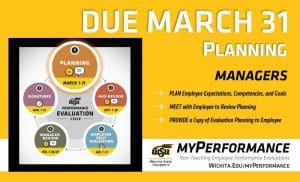
Step 1, planning, of the annual performance evaluation cycle for non-teaching employees has started and is due March 31. Managers can now login to myPerformance and add expectations, competencies, and goals for the current review period then meet with their employee to review and provide a copy of their evaluation for reference throughout the year.

Annual non-teaching employee performance evaluations for 2025-26 are now accessible for managers to complete the planning step of the myPerformance evaluation cycle. Planning should be completed by 11:59 p.m. March 31.

The 2025-26 review period begins March 1 and ends on Feb. 28, 2026. Managers should log into myPerformance to add expectations, competencies and goals for the current review period then meet with their employees to review and provide a copy of their evaluation for reference throughout the year.

Helpful hints:

  • Managers have unlimited access to update and edit content on evaluations in myPerformance until the employee self-evaluation step begins Jan. 1, 2026.
  • Be sure to save and submit anytime you update or make changes to an evaluation. You still have access to make changes after you save and submit.
  • Employees don’t have access to their 2025-26 myPerformance evaluation until the employee self-evaluation step which is why it’s important to review and provide a copy of their evaluation for reference throughout the year.
  • To find in-progress or past evaluations in myPerformance, check the small box “Show completed and expired tasks”

For more information (including myPerformance training, quick reference guides, and other resources) go to the myPerformance webpage (wichita.edu/myPerformance).


Step 1, planning, of the annual performance evaluation cycle for non-teaching employees has started and is due March 31. Managers can now login to myPerformance and add expectations, competencies, and goals for the current review period then meet with their employee to review and provide a copy of their evaluation for reference throughout the year.

Annual non-teaching employee performance evaluations for 2025-26 are now accessible for managers to complete the planning step of the myPerformance evaluation cycle. Planning should be completed by 11:59 p.m. March 31.

The 2025-26 review period begins March 1 and ends on Feb. 28, 2026. Managers should log into myPerformance to add expectations, competencies and goals for the current review period then meet with their employees to review and provide a copy of their evaluation for reference throughout the year.

Helpful hints:

  • Managers have unlimited access to update and edit content on evaluations in myPerformance until the employee self-evaluation step begins Jan. 1, 2026.
  • Be sure to save and submit anytime you update or make changes to an evaluation. You still have access to make changes after you save and submit.
  • Employees don’t have access to their 2025-26 myPerformance evaluation until the employee self-evaluation step which is why it’s important to review and provide a copy of their evaluation for reference throughout the year.
  • To find in-progress or past evaluations in myPerformance, check the small box “Show completed and expired tasks”

For more information (including myPerformance training, quick reference guides, and other resources) go to the myPerformance webpage (wichita.edu/myPerformance).
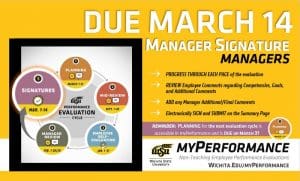
Step 5, signatures, of the annual performance evaluation cycle for non-teaching employees has started and manager signatures are due March 14. Managers can now login to myPerformance and electronically sign their employee evaluations. Additionally, the planning step for the new evaluation cycle is accessible in myPerformance and is due on March 31.

Annual non-teaching employee performance evaluations for 2024-25 will be available for manager signatures beginning March 8 provided that their employee has submitted their employee signature in myPerformance.

Managers should log into myPerformance then electronically sign and submit their employee’s 2024-25 evaluation by 11:59 p.m. Friday, March 14.

Helpful hints:

  • Progress through each page of the evaluation to review all comments and ratings.
  • Enter your name in the signature field, click “Sign,” and then click “Submit” on the approval signature page and the submit review pop-up window.
  • Check the box that says “Show completed and expired tasks” if you think an evaluation has disappeared from your scheduled tasks.
  • Don’t forget that the first step of the 2025-26 myPerformance evaluation cycle, Planning, is due on March 31, 2025.

Note: The first step of the evaluation cycle, Planning, for 2025-26 evaluations is accessible to managers in myPerformance. The Planning step is for setting expectations and goals for the new review period which runs March 1, 2025 through Feb. 28, 2026. If you have not already done so, you should enter and submit this information in myPerformance, and then meet with your employees by March 31. Your employees will not have access to their 2025-26 evaluation until Jan. 1, 2026, so it is important to provide them with a copy to use as a reference throughout the year.

For more information (including myPerformance training, quick reference guides, and other resources) go to the myPerformance webpage (wichita.edu/myPerformance).

 

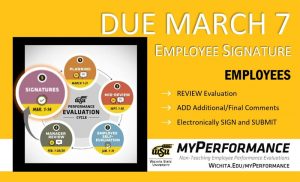
Step 5, signatures, of the annual performance evaluation cycle for non-teaching employees has started and employee signatures are due March 7. Employees can now login to myPerformance, review their evaluation, add any final comments, and electronically sign their evaluation.

Annual non-teaching employee performance evaluations for 2024-25 will be available for employee signatures beginning March 1 provided that their manager has submitted their manager review in myPerformance.

Employees should log into myPerformance then electronically sign and submit their 2024-25 evaluation by 11:59 p.m. Friday, March 7.

Helpful hints:

  • Let your manager know if you don’t have access to your evaluation. Managers must “Submit” their manager review for you to have access.
  • Progress through each page of your evaluation to review all comments and ratings.
  • Enter your name in the signature field, click “Sign,” and then click “Submit” on the approval signature page and the submit review pop-up window.
  • To find in-progress or past evaluations in myPerformance, check the small box “Show completed and expired tasks” then click “Search.”

For more information (including myPerformance training, quick reference guides, and other resources) go to the myPerformance webpage (wichita.edu/myPerformance).

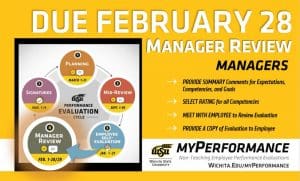
Step 4, manager review, of the annual performance evaluation cycle for non-teaching employees has started and is due February 28. Managers of non-teaching employees can now login to myPerformance, provide summary comments about their employee’s job performance and accomplishments for the year, rate their employee in each competency, and then meet with their employee to deliver their annual performance review.

Annual non-teaching employee performance evaluations for 2024-25 are now accessible to managers to complete the manager review step of the myPerformance evaluation cycle. Managers, go to myPerformance to access and complete performance evaluations for your non-teaching employees which are due by 11:59 p.m. Feb. 28.

Follow these steps to complete your evaluations for the 2024-25 review period which began March 1, 2024 and ends Feb. 28, 2025:

  • Provide summary comments for expectations, competencies and goals
  • Select rating for all competencies
  • Progress through each page of the evaluation and select “Save” then “Submit” on the final summary page for the evaluation
  • Meet with your employee(s) to review their evaluation and provide them with a copy

 Helpful hints:

  • Managers have unlimited access to update and edit performance evaluations throughout the month of February.
  • Evaluations must be saved and submitted to progress to the employee signature step on March 1. Employees will not have access to their evaluation if the manager has not submitted their review.
  • Managers can add co-planners during this step. A co-planner is someone who has managed a portion of the employee’s work assignment during the evaluation period.
  • To find in-progress or past evaluations in myPerformance, check the small box “Show completed and expired tasks” then click “Search.”

Note: End of year performance review conversations are also a great time to set expectations and goals for the new review period. The 2025-26 evaluations are now accessible to managers in myPerformance so you can discuss both the current end-of-review (2024-25 manager review) and the upcoming begin-of-review (2025-26 planning) at the same time, if desired.

For more information (including myPerformance training, quick reference guides and other resources) go to the myPerformance webpage (wichita.edu/myPerformance).
Step 4, manager review, of the annual performance evaluation cycle for non-teaching employees has started and is due February 28. Managers of non-teaching employees can now login to myPerformance, provide summary comments about their employee’s job performance and accomplishments for the year, rate their employee in each competency, and then meet with their employee to deliver their annual performance review.

Annual non-teaching employee performance evaluations for 2024-25 are now accessible to managers to complete the manager review step of the myPerformance evaluation cycle. Managers, go to myPerformance to access and complete performance evaluations for your non-teaching employees which are due by 11:59 p.m. Feb. 28.

Follow these steps to complete your evaluations for the 2024-25 review period which began March 1, 2024 and ends Feb. 28, 2025:

  • Provide summary comments for expectations, competencies and goals
  • Select rating for all competencies
  • Progress through each page of the evaluation and select “Save” then “Submit” on the final summary page for the evaluation
  • Meet with your employee(s) to review their evaluation and provide them with a copy

 Helpful hints:

  • Managers have unlimited access to update and edit performance evaluations throughout the month of February.
  • Evaluations must be saved and submitted to progress to the employee signature step on March 1. Employees will not have access to their evaluation if the manager has not submitted their review.
  • Managers can add co-planners during this step. A co-planner is someone who has managed a portion of the employee’s work assignment during the evaluation period.
  • To find in-progress or past evaluations in myPerformance, check the small box “Show completed and expired tasks” then click “Search.”

Note: End of year performance review conversations are also a great time to set expectations and goals for the new review period. The 2025-26 evaluations are now accessible to managers in myPerformance so you can discuss both the current end-of-review (2024-25 manager review) and the upcoming begin-of-review (2025-26 planning) at the same time, if desired.

For more information (including myPerformance training, quick reference guides and other resources) go to the myPerformance webpage (wichita.edu/myPerformance).