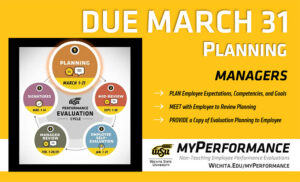
Step 1, planning, of the annual performance evaluation cycle for non-teaching employees has started and is due March 31. Managers can now login to myPerformance and add expectations, competencies, and goals for the current review period then meet with their employee to review and provide a copy of their evaluation for reference throughout the year.

Annual non-teaching employee performance evaluations for 2026-27 are now accessible for managers to complete the planning step of the myPerformance evaluation cycle. Planning should be completed by 11:59 p.m. March 31.

The 2026-27 review period begins March 1 and ends on Feb. 28, 2027. Managers should log into myPerformance to add expectations, competencies and goals for the current review period then meet with their employees to review and provide a copy of their evaluation for reference throughout the year.

A change was made for the 2026-27 evaluation form based on university feedback to simplify and reduce redundancy in the competency section comments. There is now only one comments box to capture performance expectations and progress versus a comments box for each competency.

Helpful hints:

  • Managers have unlimited access to update and edit content on evaluations in myPerformance until the employee self-evaluation step begins Jan. 1, 2027.
  • Be sure to save and submit anytime you update or make changes to an evaluation. You still have access to make changes after you save and submit.
  • Employees don’t have access to their 2026-27 myPerformance evaluation until the employee self-evaluation step, which is why it’s important to review and provide a copy of their evaluation for reference throughout the year.
  • To find in-progress or past evaluations in myPerformance, check the small box “Show completed and expired tasks.”

For more information (including myPerformance training, quick reference guides and other resources) go to the myPerformance webpage.

Step 5, signatures, of the annual performance evaluation cycle for non-teaching employees has started and manager signatures are due March 14. Managers can now login to myPerformance and electronically sign their employee evaluations. Additionally, the planning step for the new evaluation cycle is accessible in myPerformance and is due on March 31.

Annual non-teaching employee performance evaluations for 2025-26 will be available for manager signatures beginning March 8 provided that their employee has submitted their employee signature in myPerformance.

Managers should log into myPerformance then electronically sign and submit their employee’s 2025-26 evaluation by 11:59 p.m. Saturday, March 14.

Helpful hints:

  • Progress through each page of the evaluation to review all comments and ratings.
  • Enter your name in the signature field, click “Sign,” and then click “Submit” on the approval signature page and the submit review pop-up window.
  • Check the box that says “Show completed and expired tasks” if you think an evaluation has disappeared from your scheduled tasks.
  • Don’t forget that the first step of the 2026-27 myPerformance evaluation cycle, “Planning,” is due on March 31.

Note: The first step of the evaluation cycle, “Planning,” for 2026-27 evaluations is accessible to managers in myPerformance. The planning step is for setting expectations and goals for the new review period which runs March 1, 2026 through Feb. 28, 2027. If you have not already done so, you should enter and submit this information in myPerformance, and then meet with your employees by March 31. Your employees will not have access to their 2026-27 evaluation until Jan. 1, 2027, so it is important to provide them with a copy to use as a reference throughout the year.

A change was made for the 2026-27 evaluation form based on university feedback to simplify and reduce redundancy in the competency section comments. There is now only one comments box to capture performance expectations and progress versus a comments box for each competency.

For more information (including myPerformance training, quick reference guides and other resources) go to the myPerformance webpage (wichita.edu/myPerformance).

 

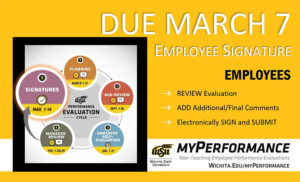
Step 5, signatures, of the annual performance evaluation cycle for non-teaching employees has started and employee signatures are due March 7. Employees can now login to myPerformance, review their evaluation, add any final comments, and electronically sign their evaluation.

Annual non-teaching employee performance evaluations for 2025-26 will be available for employee signatures beginning March 1 provided that their manager has submitted their manager review in myPerformance.

Employees should log into myPerformance then electronically sign and submit their 2025-26 evaluation by 11:59 p.m. March 7.

Helpful hints:

  • Let your manager know if you don’t have access to your evaluation. Managers must submit their manager review for you to have access.
  • Progress through each page of your evaluation to review all comments and ratings.
  • Enter your name in the signature field, click “Sign,” and then click “Submit” on the approval signature page and the submit review pop-up window.
  • To find in-progress or past evaluations in myPerformance, check the small box “Show completed and expired tasks” then click “Search.”

For more information (including myPerformance training, quick reference guides and other resources) go to the myPerformance webpage (wichita.edu/myPerformance).
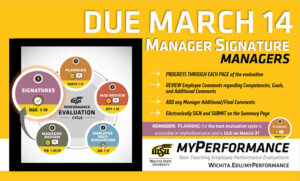
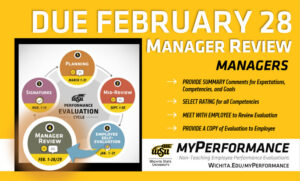
Image description: Step 4, manager review, of the annual performance evaluation cycle for non-teaching employees has started and is due February 28. Managers of non-teaching employees can now login to myPerformance, provide summary comments about their employee’s job performance and accomplishments for the year, rate their employee in each competency, and then meet with their employee to deliver their annual performance review.

Annual non-teaching employee performance evaluations for 2025-26 are now accessible to managers to complete the Manager Review step of the myPerformance evaluation cycle. Managers, go to myPerformance to access and complete performance evaluations for your non-teaching employees which are due by 11:59 p.m. Feb. 28.

Follow these steps to complete your evaluations for the 2025-26 review period which began March 1, 2025 and ends Feb. 28:

  • Provide summary comments for expectations, competencies and goals.
  • Select rating for all competencies.
  • Progress through each page of the evaluation and select “Save” then “Submit” on the final summary page for the evaluation.
  • Meet with your employee(s) to review their evaluation and provide them with a copy.

Helpful hints:

  • Managers have unlimited access to update and edit performance evaluations throughout the month of February.
  • Evaluations must be saved and submitted to progress to the employee signature step on March 1. Employees will not have access to their evaluation if the manager has not submitted their review.
  • Managers can add co-planners during this step. A co-planner is someone who has managed a portion of the employee’s work assignment during the evaluation period.
  • To find in-progress or past evaluations in myPerformance, check the small box “Show completed and expired tasks” then click “Search.”

Note: End-of-year performance review conversations are also a great time to set expectations and goals for the new review period. The 2026-27 evaluations are now accessible to managers in myPerformance so you can discuss both the current end-of-review (2025-26 Manager Review) and the upcoming begin-of-review (2026-27 Planning) at the same time, if desired.

A change was made for the 2026-27 evaluation form based on university feedback to simplify and reduce redundancy in the competency section comments. There is now only one comments box to capture performance expectations and progress versus a comments box for each competency.

For more information (including myPerformance training, quick reference guides and other resources) go to the myPerformance webpage (wichita.edu/myPerformance).
 

Staff Senate and Human Resources are excited to continue offering faculty and staff professional development opportunities made possible through grants they wrote and were awarded by the Kansas Leadership Center (KLC).

The grant provides a select number of seats for KLC’s leadership development path which starts with step one. Based on KLC’s bestselling book, “When Everyone Leads,” this six-hour course makes leadership radically accessible, unleashing capacity for collective leadership in teams, organizations, coalitions and communities.

All faculty and staff are invited to go to the KLC professional development opportunity website to learn more and find instructions for submitting an interest form.

For additional professional development resources, visit the HR professional development website.

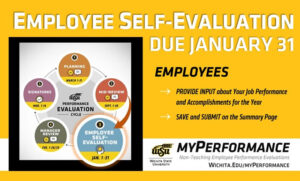
Image description: Step 3, employee self-evaluation, of the annual performance evaluation cycle for non-teaching employees has started and is due January 31. Non-teaching employees can now login to myPerformance, provide input about their job performance and accomplishments for the year, and then save and submit on the summary page.

Non-Teaching Employees, it’s time to complete your self-evaluation in myPerformance. The self-evaluation step in the performance evaluation cycle is your opportunity to provide input on your job performance and accomplishments since the beginning of the current review period that began on March 1, 2025. Go to myPerformance to access and complete your self-evaluation which is due by 11:59 p.m. Jan. 31.

Helpful hints:

  • You can access your performance evaluation as many times as you need during the month of January to update and complete your self-evaluation. Access will route from you to your manager on Feb. 1.
  • Be sure to save and submit anytime you update or make changes to your self-evaluation. You still have access to make changes after you save and submit.
  • To find in-progress or past evaluations in myPerformance, check the small box “Show completed and expired tasks” then click “Search.”

For more information (including myPerformance training, quick reference guides and other resources) go to wichita.edu/myPerformance.

2025 Bender of Twigs inductees.

Photos from the 2025 Service Recognition events are posted and available to view online on the Service Recognition website. The events recognized colleagues who reached a milestone of five to 50 years of service with the State of Kansas, those inducted into the Bender of Twigs, and those who’ve retired from the university.

Thank you again to all the honorees for your dedicated service to Wichita State University and to those who helped WSU celebrate and recognize them. Collectively, 4,980 years of service were recognized. Congratulations again to all the honorees.

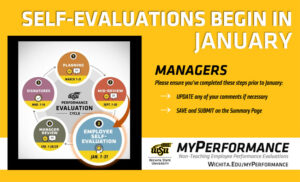
myPerformance Self-Evaluations begin in January. Managers, please ensure you've completed these steps prior to January: Update any of your comments if necessary, and Save and Submit on the Summary Page.

Managers of non-teaching employees, here’s what you need to know.

At the start of January, your employees will be able to view content you entered during the planning and mid-review steps of the evaluation cycle when they go in to complete their self-evaluation. You’ll regain access to their evaluations for the manager review during the month of February.

Please complete these steps before the winter break to prepare for employee self-evaluations:

  • Update any of your comments on your employees’ competencies and goals if necessary.
  • Save and submit on the summary page to ensure your comments route to your employee.
  • Touch base with your employees about upcoming self-evaluations and ensure they have what they need to successfully evaluate themselves at the start of January.

More information to come at the beginning of January for the employee self-evaluation.

Managers can access employee evaluations in myPerformance.

For more information (including myPerformance training, quick reference guides and other resources) go to wichita.edu/myPerformance.

To find in-progress or past evaluations in myPerformance, check the small box “Show completed and expired tasks” then click “Search.” Select the evaluation and you’ll have the option to print or save to PDF.

A history walking tour November 4 starting at Fiske Hall.

Strap on some comfortable shoes and join a guided walking tour beginning at 2 p.m. Tuesday, Nov. 4, starting in Fiske Hall, for an opportunity to build connections with fellow colleagues and deepen your knowledge of WSU.

You don’t want to miss this event presented by Staff Senate and hosted by the Department of History. Hot apple cider will keep you warm and Dr. Jay Price will keep you entertained as he takes you around campus and imparts his deep knowledge of Wichita State campus history.

WSU Service Recognition 2025

Wichita State employees who reached a service milestone between the dates of Sept 2, 2024 and Sept. 1, 2025 will be honored at events hosted by the university in November.

The event for honorees celebrating milestones of five to 20 years of service with the State of Kansas will be held from 2 to 4 p.m. Nov. 12 in 305/306 Rhatigan Student Center, Beggs Ballroom. The event is open to all employees to attend and celebrate with their colleagues who are honorees. RSVP by Friday, Oct. 24 if you will attend the event.

The event for honorees celebrating milestones of 25-50 years of service with the State of Kansas, Bender of Twigs (25 years dedicated to Wichita State) and those having retired from the university will be held on Nov. 13. This is an invitation only dinner event for honorees and their guest.

To view a list of the 2025 Service Recognition Honorees or see more information about Wichita State’s annual employee Service Recognition program, visit the service recognition webpage.