CourseLeaf CIM logo with leaf image.

All faculty and staff are invited to attend the fall training session for CIM (curriculum management software). This 1.5 hour virtual training session will be held from 1 to 2:30 p.m. Wednesday, Sept. 16.

The session will provide a demonstration of the new CourseLeaf dashboard, how to submit a curriculum change proposal via the online CIM course and program forms, how to search for existing proposals, how a proposal moves through the electronic workflow and how to approve proposals.

Registration is required to attend the session. To register, go to myTraining in myWSU, then search for “CourseLeaf Curriculum (CIM) Administrator & Faculty Remote Training.”

After registering, a link to the session will be emailed 24 hours in advance of the training. Reach out to Carrie Wyatt at carrie.wyatt@wichita.edu if you have not received a Zoom link within 24 hours of the session start time.

To log into CIM during the training session, participants will need a dual authentication (DUO) device.

Staff and faculty who are unable to attend a session can view CourseLeaf user guides on the Registrar Office’s website

Logo for CourseLeaf CAT including a leaf image.

All faculty and staff involved with the annual catalog update and review are invited to attend the fall training session for CAT (catalog software). This 45-minute virtual training session will be held from 1 to 1:45 p.m. Thursday, Sept. 24.

The session will provide a demonstration of how to view, edit and approve catalog pages as well as a walk-through of the new CourseLeaf dashboard.

Registration is required to attend the session. To register, go to myTraining in myWSU then search for “CourseLeaf Catalog (CAT) Workflow Approver Training.”

After registering, a link to the session will be emailed 24 hours in advance of the training. Reach out to Carrie Wyatt at carrie.wyatt@wichita.edu if you have not received a Zoom link within 24 hours of the session start time.

To log into CAT during the training session, participants will need a dual authentication (DUO) device.

Staff and faculty who are unable to attend a session can view CourseLeaf user guides on the Registrar Office’s website
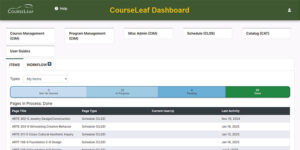
Screenshot of the new CourseLeaf dashboard

CAT, CIM, CLSS and Approve Pages will be unavailable from 11 p.m. Wednesday, April 29 until 10 a.m. Thursday, April 30 as CourseLeaf installs an upgrade and performs maintenance.

Visit wichita.edu/CourseLeaf for instructions on how to navigate the new dashboard. Instructions specific to each module are also provided on this same webpage.

CourseLeaf will have a fresh look soon as WSU moves to a new version that introduces a user dashboard. Visit wichita.edu/courseleaf for easy instructions on how to navigate the dashboard.

The new CourseLeaf dashboard provides:

  • Access to CIM, CLSS, CAT, Workflow and user guides from one screen
  • A more personalized user experience
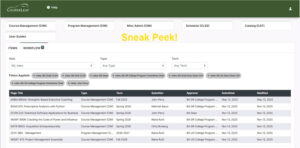
  • Easy-to-use filtering and sorting options
  • A visual thermometer to sort your proposals by status
  • A new layout for the “Approve Pages” screen
  • Improved accessibility
  • A better experience on small screens
Computer image showing tabs to access CIM, CLSS, CAT, User Guides and Workflow Approvals. Image also shows how multiple roles can be selected so a user can see all proposals for all of their workflow roles in one list.

CourseLeaf will have a fresh look soon as it moves to a new version that introduces a user dashboard. Watch for updates and instructions in the next few weeks.

The new CourseLeaf dashboard provides:

  • Access to CIM, CLSS, CAT, Workflow and User Guides from one screen
  • A more personalized user experience
  • Easy-to-use filtering and sorting options
  • A visual thermometer to sort your proposals by status
  • A new layout for the Approve Pages screen
  • Improved accessibility
  • A better experience on small screens

All faculty and staff are invited to attend one of the upcoming Curriculum Management (CIM) virtual training sessions available this semester at the following dates and times:

  • 10-11:30 a.m. Tuesday, Sept. 16
  • 1-2:30 p.m. Wednesday, Sept. 17

The Zoom sessions will provide a demonstration of how to submit a curriculum change proposal via the online CIM course and program forms, how to search for existing proposals, how a proposal moves through the electronic workflow and how to approve proposals.

Registration is required to attend the session. To register, visit the myTraining link on the Faculty/Staff tab of myWSU, then search for “CourseLeaf Curriculum (CIM) Administrator & Faculty Remote Training.”

After registering, a link to the session will be emailed 24 hours in advance of the training. Reach out to the corby.redington@wichita.edu if a Zoom link has not been received within 24 hours of the session start time.

To log into CIM during the training session, participants will need a dual authentication (DUO) device.

Staff and faculty who are unable to attend a session can view CourseLeaf user guides on the Registrar Office’s website.

Graphic with different colored leaves and the text 'Section Schedules CLSS,' 'Curriculum CIM' and 'Catalog CAT'

Register in myTraining for a 30-minute, remote training session on how to review/approve proposals in any of the CourseLeaf modules (CLSS, CIM, CAT). Two date options for each module are being offered this fall.

  • CLSS – How to review/approve proposed CRNs and the entire department’s course schedule (August sessions)
  • CIM – How to review/approve proposed curriculum changes for courses and programs (September sessions)
  • CAT – How to review/approve proposed wording and layout of catalog pages (September sessions)

Visit wichita.edu/courseleaf for user guides and other helpful resources.

Starting October 2024, schedule builders, department chairs and deans will use a new CourseLeaf module called CLSS (pronounced “class”) to create and approve their department’s schedule of courses. Several training sessions will be taught Oct. 22-23 by a CourseLeaf Software Trainer and the Registrar’s Office. Register via the myTraining link in myWSU.

  • Schedule builders: All current and new schedule-builders are required to attend training to receive access to CLSS. Register for a two hour “CLSS Schedule Building’ training session:
    • Oct. 22 from 9:30 to 11:30 a.m. or 1 to 3 p.m.
    • Oct. 23 from 9 to 11 a.m. or 12:30 to 2:30 p.m.
  • Department chairs and deans: Those in the workflow approval process of schedule-building can register for one of two ‘CLSS Workflow Approver’ 45-minute training sessions:
    • Oct. 22 from 3:15 to 4 p.m.
    • Oct. 23 from 2:45 to 3:30 p.m.
  • Open labs: Schedule-builders and approvers can register for as many ‘CLSS Schedule Building Open Lab’ sessions as they’d like:
    • Oct. 24 from 9 to 11 a.m. or 3 to 5 p.m.
    • Nov. 6, Nov. 14, Nov. 20, Dec. 5, Dec. 15 and Dec. 18, all from 2 to 3 p.m.

Visit the CourseLeaf website to log into CAT and CIM and to view curriculum deadlines, user guides, curriculum change guidelines, the standard syllabus template and other helpful links for faculty and staff.

All faculty and staff are invited to attend one of four upcoming Curriculum Management (CIM) virtual training sessions available this semester from 1 to 3 p.m. on the following dates:

  • Wednesday, Sept. 6
  • Tuesday, Sept 12
  • Thursday, Sept. 21
  • Wednesday Oct. 4

The two-hour Zoom session will provide a demonstration of how to submit a curriculum change proposal via the online CIM course and program forms, how to search for existing proposals, how a proposal moves through the electronic workflow and how to approve proposals.

Registration is required to attend the session. To register, visit the myTraining link on the Faculty/Staff tab of myWSU, then search for “CourseLeaf Curriculum (CIM Administrator & Faculty Remote Training.”

A link to the session will be emailed 24 hours in advance of the training after registering. Reach out to Corby Redington at corby.redington@wichita.edu if you do not receive a Zoom link within 24 hours of the session start time.

To log into CIM during the training session, participants will need a dual authentication (DUO) device.

Staff and faculty who are unable to attend a session can view CourseLeaf user guides on the Registrar Office’s website.