This hands-on training, from 9 to 11 a.m. Tuesday, Oct. 27 virtually via Microsoft Teams, covers foundational skills in the collaboration tool that brings chat, meetings, calls and files into one place.

Whether you are new to Teams or looking to strengthen your existing skills, this session will leave you better equipped to navigate the app, use Chat for direct and group conversations, work inside Teams and channels with tabs and files, schedule and join meetings, place calls and manage voicemail, and adjust your global Teams settings.

To register, log in to myTraining and search for “Microsoft Teams Essentials.” Space is limited, so register early.

This hands-on training, from 9 to 11 a.m. Tuesday, Oct. 20 virtually via Microsoft Teams, covers foundational skills in one of the most widely used presentation tools in higher education.

Whether you are new to PowerPoint or looking to strengthen your existing skills, this session will leave you better equipped to navigate and utilize the tools in PowerPoint to create compelling presentations with efficiency.

To register, log in to myTraining and search for “PowerPoint Essentials.” Space is limited, so register early.
This hands-on training, from 9 to 10 a.m. Thursday, Oct. 15 virtually via Microsoft Teams, is designed to help staff and faculty work more efficiently with Microsoft OneDrive by learning how to organize files, collaborate with others, share content securely, restore previous versions, manage storage responsibly and reduce the clutter of email attachments and duplicate documents.

Whether you’re new to OneDrive or looking to build better habits, you’ll leave with practical skills you can immediately apply to your daily work.

To register, log in to myTraining and search for “OneDrive Essentials.” Space is limited, so register early.

This hands-on training, from 9 to 11 a.m. Tuesday, Oct. 13 virtually via Microsoft Teams, is designed to help you confidently navigate, manage and collaborate within SharePoint sites.

Whether you’re new to SharePoint or looking to strengthen your existing skills, this session will provide a practical introduction to SharePoint’s core features and best practices. You’ll learn how to find information quickly, collaborate with colleagues, manage documents, and make the most of your team’s online workspace.

To register, log in to myTraining and search for “SharePoint 1: Foundations.” Space is limited, so register early.

The Microsoft Power User Program is getting an upgrade. Your power user journey now has a tool to track your progress, along with some shiny new badges to showcase on your resume, email or LinkedIn.

New power users

WSU employees can request the Microsoft Office 365 or Microsoft Cloud power user curriculum in myTraining to begin their power user path. Once enrolled, progress is tracked automatically in myTraining.

If you still have trainings to complete, you can select the course(s) needed directly from the curriculum and register for an upcoming session.

Current power users

You will soon receive an email from WSU’s new credentialing platform, Territorium, with instructions on how to access and display your updated power user badges.

Check out the Microsoft Office 365 and Microsoft Cloud power user curriculums in myTraining to start your power user path today,

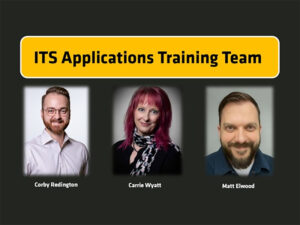
Applications Training Team Photo

The ITS Applications Training Team is excited to announce a fresh set of training opportunities to help faculty and staff work smarter, navigate university systems with confidence and get the most from the technology they use every day.

The team provides practical, role-based learning, including in-person and remote instructor-led trainings and asynchronous online courses. Whether you’re new to a system or looking to sharpen your skills, there’s a resource designed for you.

Meet the team:

  • Corby Redington – manager and trainer for Banner ePAF, Finance and WSU Reporting
  • Carrie Wyatt – Training specialist for Banner Student and CLSS Schedule Building
  • Matt Elwood – Training specialist for Microsoft Office & Cloud applications

Invest in your success. Explore upcoming courses and register today in myTraining. To learn more about the team, visit the ITS Applications Training webpage.

This hands-on training, from 9 to 11 a.m. Tuesday, Oct. 1 virtually via Microsoft Teams, takes your formula skills to the next level. Save yourself time and let Microsoft Excel do the work for you.

This course is designed for those already comfortable with Microsoft Excel and not for beginners. This session will leave you better equipped to use valuable formulas that turn repetitive work into worksheets that update themselves.

To register, log in to myTraining and search for “Excel: Advance Formulas.” Space is limited, so register early.

This hands-on training, from 9 to 11 a.m. Tuesday, Sept. 29 virtually via Microsoft Teams, introduces the workbook enhancements that turn raw data into clear, polished visuals.

This course is designed for those already comfortable with Microsoft Excel and not for beginners. This session will leave you better equipped to build and refine PivotTables, create PivotCharts and standalone charts, and use picture formatting to give your workbooks a finished, report-ready look.

To register, log in to myTraining and search for “Excel: Pivot Tables and Charts.” Space is limited, so register early.

This hands-on training, from 9 to 11 a.m. Thursday, Sept. 22 virtually via Microsoft Teams, covers foundational skills in the spreadsheet tool used across higher education for everything from rosters and budgets to schedules and reports.

Whether you are new to Microsoft Excel or looking to strengthen your existing skills, this session will leave you better equipped to format cells, build simple calculations, work with tables and flash fill, set up print areas and manage multiple sheets within a workbook.

To register, log in to myTraining and search for “Excel Essentials.” Space is limited, so register early.

This hands-on training, from 9 to 10 a.m. Thursday, Sept. 17 virtually via Microsoft Teams, helps staff and faculty work more efficiently with Microsoft OneDrive by learning how to organize files, collaborate with others, share content securely, restore previous versions, manage storage responsibly and reduce the clutter of email attachments and duplicate documents.

Whether you’re new to OneDrive or looking to build better habits, you’ll leave with practical skills you can immediately apply to your daily work.

To register, log in to myTraining and search for “OneDrive Essentials.” Space is limited, so register early.