
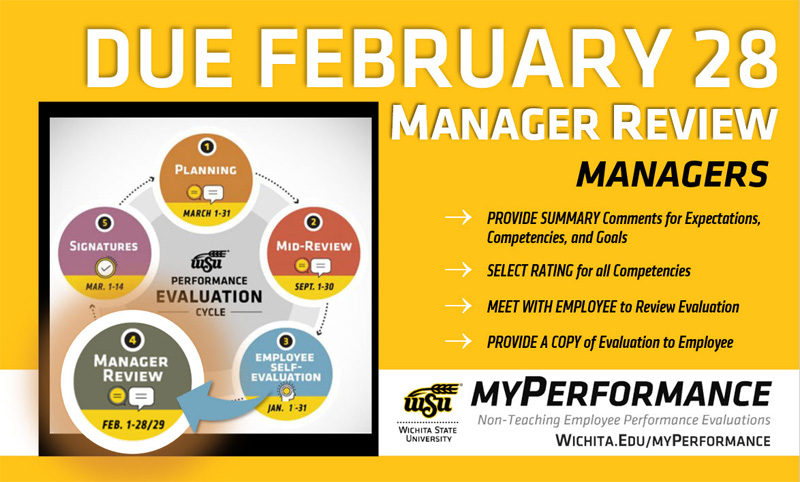
Annual non-teaching employee performance evaluations for 2025-26 are now accessible to managers to complete the Manager Review step of the myPerformance evaluation cycle. Managers, go to myPerformance to access and complete performance evaluations for your non-teaching employees which are due by 11:59 p.m. Feb. 28.
Follow these steps to complete your evaluations for the 2025-26 review period which began March 1, 2025 and ends Feb. 28:
- Provide summary comments for expectations, competencies and goals.
- Select rating for all competencies.
- Progress through each page of the evaluation and select “Save” then “Submit” on the final summary page for the evaluation.
- Meet with your employee(s) to review their evaluation and provide them with a copy.
Helpful hints:
- Managers have unlimited access to update and edit performance evaluations throughout the month of February.
- Evaluations must be saved and submitted to progress to the employee signature step on March 1. Employees will not have access to their evaluation if the manager has not submitted their review.
- Managers can add co-planners during this step. A co-planner is someone who has managed a portion of the employee’s work assignment during the evaluation period.
- To find in-progress or past evaluations in myPerformance, check the small box “Show completed and expired tasks” then click “Search.”
Note: End-of-year performance review conversations are also a great time to set expectations and goals for the new review period. The 2026-27 evaluations are now accessible to managers in myPerformance so you can discuss both the current end-of-review (2025-26 Manager Review) and the upcoming begin-of-review (2026-27 Planning) at the same time, if desired.
A change was made for the 2026-27 evaluation form based on university feedback to simplify and reduce redundancy in the competency section comments. There is now only one comments box to capture performance expectations and progress versus a comments box for each competency.
For more information (including myPerformance training, quick reference guides and other resources) go to the myPerformance webpage (wichita.edu/myPerformance).